Falco is a cloud native runtime security tool for actively monitoring Kubernetes clusters at runtime. It graduacted project and designed to detect and alert on abnormal behavior and potential security threats in real-time. At its core, Falco is a kernel monitoring and detection agent that uses to observe events, such as syscalls, based on custom rules. Falco can enhance these events by integrating metadata from the container runtime and Kubernetes. The collected events can be analyzed, visualized, and used to trigger alerts.
In this guide, we will walk you through the process of enhancing Talos Linux security by deploying Falco Kubernetes Runtime Security and configure it with eBPF for kernel monitoring. As a bonus step, we will also configure fluentbit to forward audit logs from the Kubernetes control plane (Talos specific).
Prerequisites
A running Talos Kubernetes cluster (v1.30+ recommended, at least 3 worker nodes with 4GB RAM each).
kubectl, and HELM CLI installed.
A deployed Flux Operator (Optional): reference the following .
Why use a Runtime Security on Kubernetes?
For years, container security has been dominated by pre-deployment gates — image scanning, static analysis, and configuration checks. These are essential, but they’re only predictive. They tell you what might go wrong before a container ever starts in a production environment. True security doesn’t end when a container passes its scan and reaches production.
That’s where Runtime Security comes in. It continues protection where your CI/CD pipeline stops — actively monitoring system calls, network activity, file integrity, and process behavior in real time. By providing visibility into every system calls and processes initiated by containers to the Linux kernel, you move from passive to active defense — catching and defending against advanced runtime threats as they happen. Containers by design do not provide a hard security boundary. Relying solely on default container isolation and Kubernetes-native controls leaves your clusters exposed to advanced runtime threats such as:
About the Author
Arnaud S.
Principal Cloud Platform Engineer
Observability
tracing
Container Escape & Privilege Escalation: Containers are not virtual machines — they are simply isolated processes sharing the host kernel. Once an attacker compromises a pod, their immediate priority is usually to escape the container. This can be achieved by exploiting vulnerabilities in the shared Linux kernel or by abusing overly permissive configurations, such as running as root or mounting the host filesystem. Successful escape grants the attacker root access to the underlying Kubernetes worker node, effectively compromising the entire host.
Crypto-mining and Resource Abuse: Many malicious actors simply want to hijack your computing power. They silently inject malicious payloads that consume CPU, memory, and GPU resources, driving up your cloud bills while degrading performance and starving legitimate applications.
File access in sensitive directories and Data Exfiltration: The ultimate goal of many attackers is to steal sensitive information — customer databases, proprietary code, credentials, or API keys. At runtime, data exfiltration often appears innocent: a seemingly legitimate pod suddenly initiates outbound connections to unknown external IPs, uses DNS tunneling, to transfer large volumes of data out of the cluster.
Unexpected network connections (Lateral Movement): Once a bad actor establishes a foothold in the cluster, their next step is usually lateral movement. In a typical flat Kubernetes network, a compromised frontend pod can often communicate freely with backend databases, internal APIs, and other services. Without strong identity-aware segmentation, attackers can easily pivot from their initial compromised container to higher-value targets across the cluster.
Supply Chain Attacks (Shell spawned inside a pod): Supply chain attacks happen when malicious code is injected into a trusted open-source dependency or base image. These attacks easily bypass CI/CD scanning and image checks, remaining dormant until runtime — where they quietly execute unauthorized processes or connect to a command-and-control (C2) server.
Choosing the Right Runtime Security for Talos Linux
Talos Linux is an immutable, minimal, and security-hardened OS built specifically for Kubernetes. Its design (read-only root filesystem, no shell by default, strong syscall surface reduction) already gives you a solid baseline. However, for runtime threat detection, you still need a dedicated tool. Here’s a table that summarizes the best runtime security solution for Talos:
Top Runtime Security Options for Talos Linux
Tool
Driver
Strengths on Talos
Best for
Ease of Deployment
Tetragon (by Cilium)
eBPF
Excellent performance, policy enforcement, deep visibility
Production clusters, security teams
Very Good
Falco (CNCF graduated)
eBPF + Kernel module (optional)
Mature ruleset, huge community, CNCF project
Alerting & compliance
Excellent
Tracee (by Aqua Security)
eBPF
Great for behavioral detection, easy rules
Developers & DevSecOps
Good
Sysdig
eBPF
Commercial support, strong forensics
Enterprise environments
Good
Here at EvoCloud, we have built a production grade cloud-native platform leveraging a number of tools and technologies from the CNCF landscape. Given that Falco is a graduated CNCF project, and one of the most popular open-source runtime security tools for Kubernetes, containers, and Linux hosts, the choice was very easy. In the following sections we will walk you through a complete setup of Falco Runtime Security on Talos Linux.
Installing the Falco Operator
The Falco Operator is now the recommended way to deploy Falco ecosystem on Kubernetes. It provides a declarative, Kubernetes-native experience with Custom Resources for managing Falco instances, rules, plugins, and configuration. To install the Falco Operator in the falco-operator namespace, we can use Helm or a Flux ResourceSet.
Installation via Helm
Create the namespace with the proper label to enable for privillege execution in Talos Linux:
# Expected output:NAME READY STATUS RESTARTS AGE
falco-operator-56c9f9c5bd-tltlq 1/1 Running 0 2d19h
Deploying a Falco Instance
Now that we have installed the falco operator, we will leverage the Falco Custom Resourse to create a falco running instance in the falco-system namespace.
Install Falco Instance via Custom Resource
Create the namespace with the proper label to enable for privillege execution in Talos Linux:
The Falco instance is deployed as a DaemonSet with modern_ebpf driver and syscall monitoring.
shell
kubectl get falco -n falco-system
And here is the expected output:
bash
# Expected output:NAME TYPE VERSION DESIRED READY RECONCILED AVAILABLE AGE
falco DaemonSet 0.44.1 99 True True 3d10h
Let's verify the daemonset resources that Falco created are up and running.
shell
kubectl get daemonset -n falco-system
And here is the expected output:
bash
# Expected output:NAME DESIRED CURRENT READY UP-TO-DATE AVAILABLE NODE SELECTOR AGE
falco 99999<none> 3d10h
Enabling Falco Plugins
Falco Plugins are the modern way to extend Falco’s capabilities without modifying its core. Plugins allow you to add new event sources (e.g., Kubernetes Audit Logs, AWS CloudTrail, GitHub, etc.) or enrich existing events with additional fields (e.g., container metadata, Kubernetes pod/namespace info). We will deploy the following Falco plugins using custom resources:
Install Falco Container Meta Plugin
Falco Container meta plugin enriches container metadata fields. Here is the custom resource to deploy it:
Falco Kubernetes audits plugin adds an additional event source for auditing Kubernetes control plane and API activities. Here is the custom resource to deploy it:
Notes: For the k8saudit plugin to receive events, you must configure your Kubernetes API server to send audit logs to this endpoint via webhook (http://:9765/k8s-audit). We will do so later using fluentbit to forward audit logs from Talos Linux.
Apply the configuration:
shell
kubectl apply -f falco-plugin-k8saudit-cr.yaml
Install Falco Json Plugin
Falco Json plugin enables JSON field extraction, and its recommended for structured output. Here is the custom resource to deploy it:
Falco Detection Rules are the heart of Falco Runtime Detecting Engine. They define what suspicious or malicious behavior looks like. Rules are grouped into rulesets, and we will deploy them using the Rulesfile custom resource
Install Falco Core Rules
Falco-rules are core stable rules, used for general runtime security (syscall + container). Here is the custom resource to deploy it:
Falco-k8saudit-rules are rules for Kubernetes audit logs, used for monitoring Kubernetes Control plane and API activities. Here is the custom resource to deploy it:
Notes: Pay special attention to the PRIORITY column; lower numbers are applied first.
Configuring Falco via Custom Resource
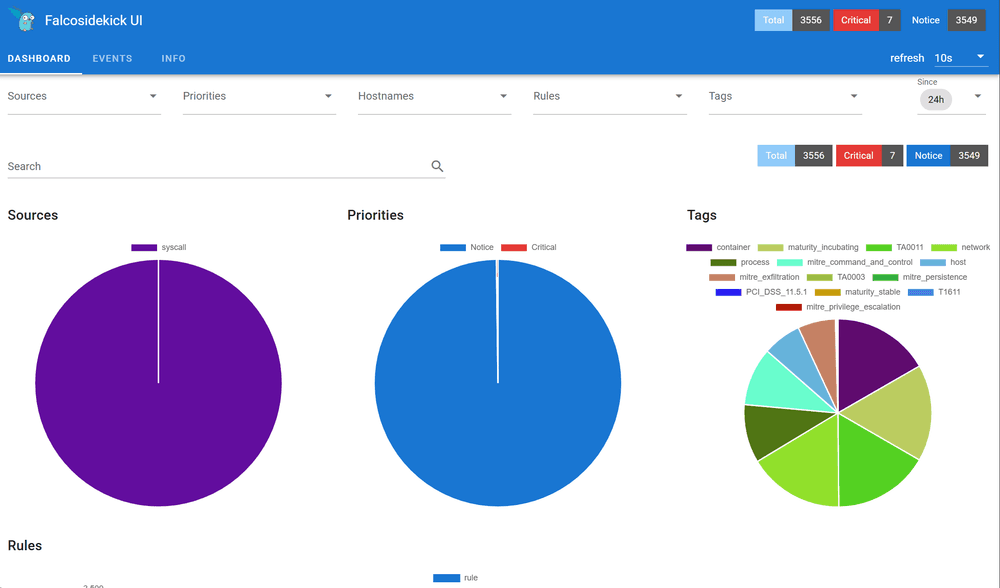
Falco configuration can be done using the Config custom resource. Here we wil configure falco to enable standard outpout (stdout), json output, and we will forward events to the Falcosidekick component. Then later we will configure the Falcosidekick-ui for visualization.
Notes: Any additional configuration we would like to apply to Falco, can be done using the Config custom resource. The spec.config.priority defines the ordering in wich many config custom resources are applied; configs with lower priority numbers are applied first.
Falcosidekick component service endpoint is also referenced in spec.config.http_output.url (url: "http://falcosidekick.falco-system.svc:2801"); we will deploy it in later steps.
Deploying Falco Additional Components
Falco's Component custom resource, enables you to to deploy additional companion applications that are part of the Falco ecosystem. Here we will deploy and configure the Falcosidekick and the Falcosidekick-ui components.
Installing Falcosidekick Component
Falcosidekick is a companion application (fan-out router) that receives alerts from Falco and routes them to various 50+ destinations simultaneously. It provides:
Falco Metacollector is a companion application that centralizes Kubernetes metadata for Falco instances to consume via the Falco Kubernetes meta plugin which connects to this service on port 45000.
Here is the custom resource to deploy the Falco Metacollector component:
Enjoyed this read? Get the next one in your inbox.
Sharp insights on cloud native, Kubernetes, and platform engineering — curated by the EvoCloud team. One concise email, delivered straight to your inbox. No fluff, no spam, unsubscribe any time.
Hand-picked tutorials, deep dives, and release notes
Cloud & platform-engineering trends worth your time
Early access to EvoCloud features and community events
 Arnaud S.Updated 25 minIntermediate