Strimzi is a project that simplifies running Apache Kafka Cluster on Kubernetes. It uses the Strimzi Cluster Operator and a rich set of Kubernetes Custom Resources (Kafka, KafkaNodePool, KafkaTopic, KafkaUser, etc.) to manage the entire lifecycle of Kafka clusters. From deployment and scaling to upgrades, TLS encryption, authentication, monitoring, and self-healing, Strimzi handles the heavy lifting. When paired with the Flux Operator, it continuously reconciles the desired state, ensuring your Kafka infrastructure remains consistent and auditable, while maintaining full GitOps compatibility.
As a foundational component of the , Kafka provides the infrastructure needed to run real-time data pipelines and build event-driven applications. This guide walks you through deploying and configuring a production-grade Kafka cluster on Kubernetes using Strimzi and Flux Operator.
Prerequisites
A running Kubernetes cluster (v1.30+ recommended, at least 3 worker nodes with 4GB RAM each).
A default storage class with dynamic provisioning (Longhorn, or Rook Ceph, etc)
kubectl and HELM CLI installed.
A deployed Flux Operator: reference the following .
Why use Strimzi to run Kafka on Kubernetes?
While deploying Kafka directly with standard Kubernetes resources like StatefulSet, Service, and ConfigMap is possible, the process is often complex, error-prone, and time-consuming. Strimzi dramatically reduces this complexity, and provides the following advantages:
Native Kubernetes integration: Strimzi transforms Kafka into a cloud-native application by extending the Kubernetes API with Custom Resources (CRs) like Kafka, KafkaTopic, and KafkaUser. This allows you to define Kafka components at a high level (using YAML manifests), while the Strimzi operators automatically manage the underlying Kubernetes resources.
Declarative cluster management: Declarative control allows you to manage resources like topics and users directly using YAML manifests. This facilitates GitOps workflows, version-controlled, and consistent automated pipelines.
About the Author
Arnaud S.
Principal Cloud Platform Engineer
CRDs
Operator
Kubernetes
Support for upgrade, scaling, and recovery: Strimzi operators automate rolling upgrades and recovery of Kafka components with minimal manual intervention and downtime. They also support scaling of Kafka clusters through node pools, automated partition reassignment (using Cruise Control), and safe node removal (using the Strimzi Drain Cleaner).
Integrated support for data streaming pipelines: When Strimzi is installed, you can deploy and manage Kafka clusters alongside supporting components such as Kafka Connect, MirrorMaker 2, and HTTP Bridge, all using Kubernetes-native custom resources.
Integrated security: Strimzi enables fine-grained access control through listener-level authentication, cluster-wide authorization, and network policies. It simplifies certificate management, supports TLS encryption with configurable protocols and cipher suites, and manages secure client access through KafkaUser resources with ACLs, quotas, and credential management.
High-Level Architecture
First, we will provide a high-level architectural overview of the Strimzi Operator internals, detailing the role of each operator and the Custom Resources that trigger them.
Then, we will present a complete production-grade Kafka cluster deployment architecture on Kubernetes using Strimzi and Flux Operator.
Strimzi Operator Architecture
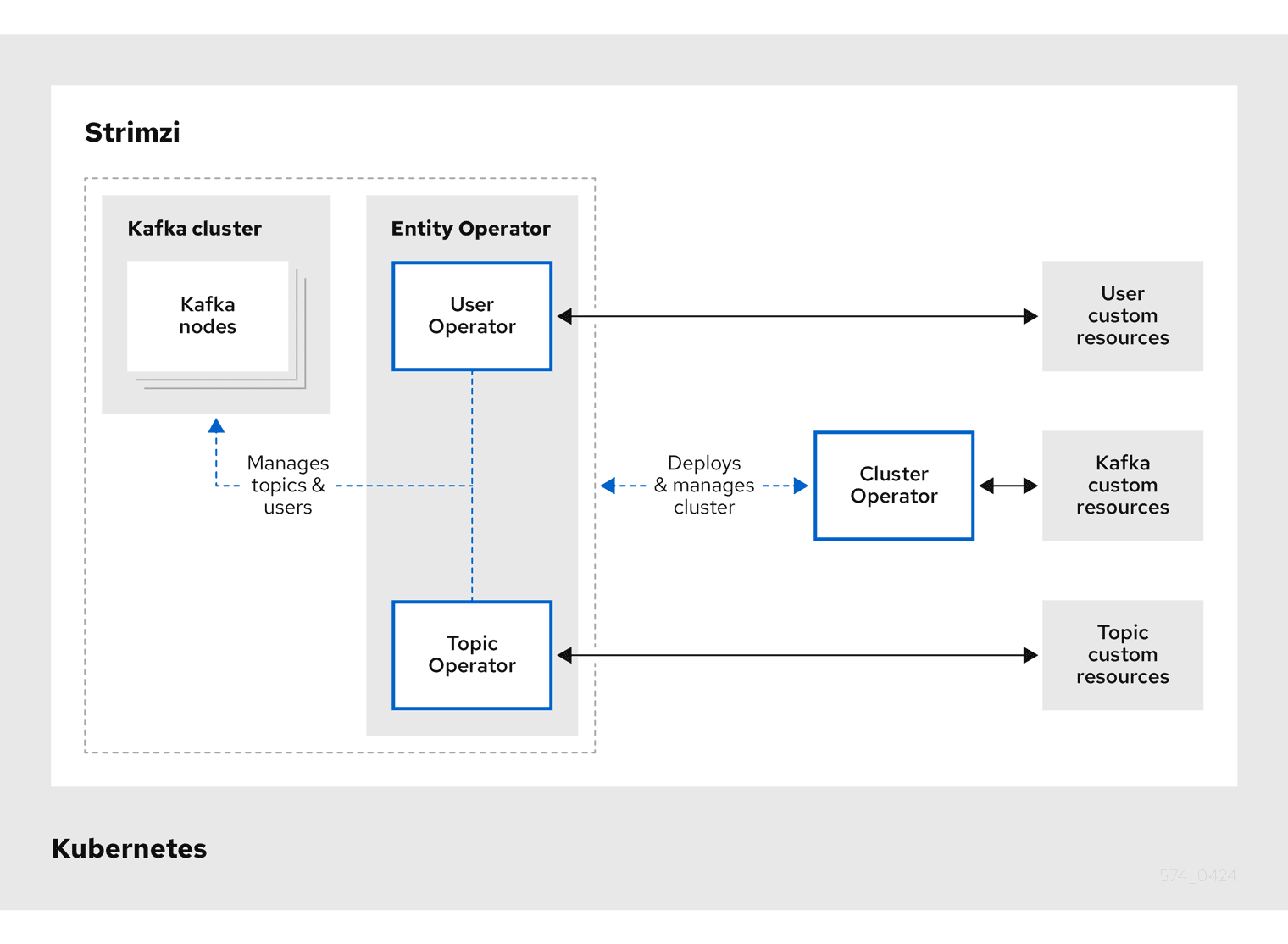
Strimzi provides a set of operators to automate the deployment and management of Apache Kafka on Kubernetes. Strimzi custom resources define the configuration for each deployment. Here are the main operators and their roles:
Cluster Operator: Deploys and manages the Kafka clusters along with the Entity Operator.
Topic Operator: Creates, configures, and deletes Kafka topics.
User Operator: Creates, configures, and manages Kafka users and their authentication credentials.
The Cluster Operator, in addition to creating and managing Kafka clusters, can deploy the Entity Operator, which runs the Topic Operator and the User Operator in a single pod. Additionally, Strimzi provides the Drain Cleaner, a separate tool that can be used alongside the Cluster Operator to assist with safe pod eviction during maintenance or upgrades.
The Entity Operator does not manage Kafka clusters. It simply runs the Topic Operator and the User Operator in separate containers within its pod, allowing them to handle topic and user management.
The Cluster Operator is the one responsible for deploying and managing Kafka clusters.
Deployment Architecture
When deploying a Kafka cluster in a production environment, there are few key considerations to keep in mind:
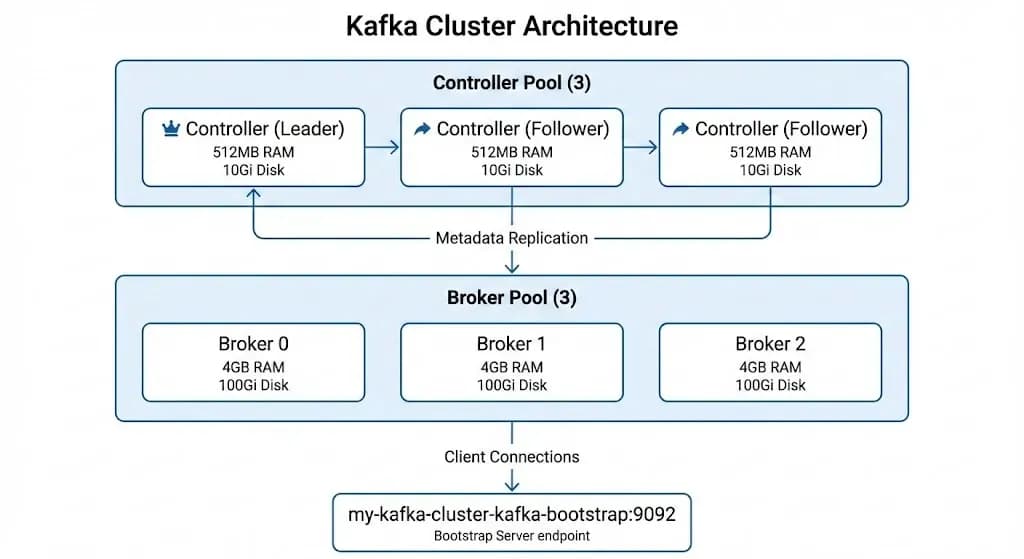
Deploy Kafka in KRaft Mode: Eliminate the ZooKeeper dependency by using Kafka’s native consensus protocol, KRaft (Kafka Raft). KRaft was introduced in Kafka 3.3 and has been production-ready since version 3.5.
Dedicated Worker Nodes: When possible, run Kafka on dedicated Kubernetes worker nodes with specific taints. This isolates Kafka workloads and prevents other applications from sharing the same nodes' resources.
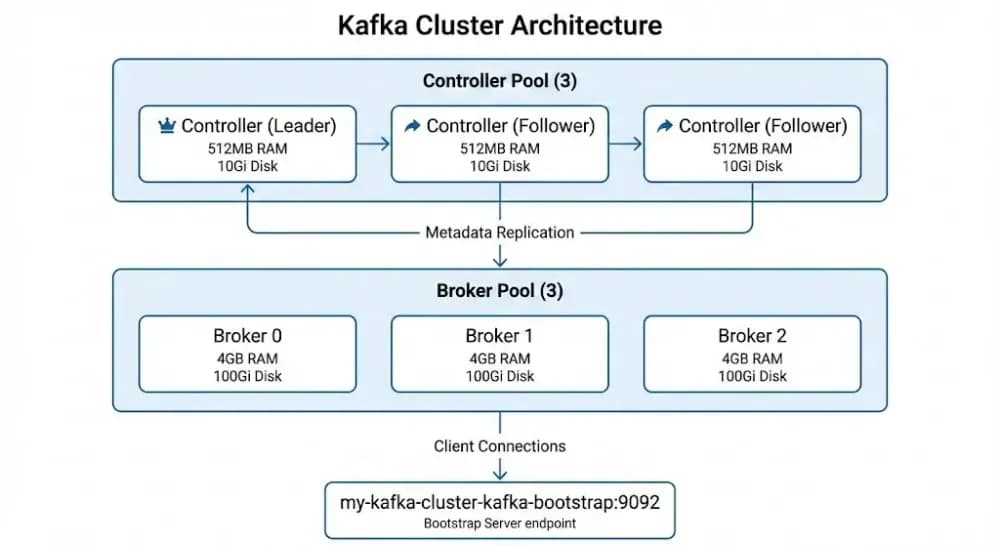
Separate Controller and Broker Node Pools: Leverage the KafkaNodePool resources to run a dedicated Controller node pool and a dedicated Broker node pool. This separation provides resource isolation (controllers are lightweight and focus on metadata/leader elections and requires an odd number like 3, while brokers handle high I/O data plane traffic and can scale beyond 3), improves stability, avoids resource contention, enables independent scaling of brokers, and enhances overall fault tolerance.
This deployment setup represents the recommended production architecture when running a Kafka cluster in Kubernetes using the Strimzi Operator. Dual-role (combined controller + broker) nodes should generally be avoided, and Zookeeper should be replaced with KRaft in production.
Install the Strimzi Kafka Operator
Install the Strimzi Kafka Operator in the strimzi-kafka-cluster namespace, using Helm or Flux ResourceSet.
Install Strimzi Kafka Operator via Flux ResourceSet (optional)
Assuming you already have the Flux Operator installed (if not, follow this guide to deploy it), you can leverage its ResourceSet custom resource to deploy the Strimzi Kafka Operator in a Gitless fashion.
kubectl get pods -n strimzi-kafka-cluster -lname=strimzi-cluster-operator
And here is the expected output:
bash
# Expected output:NAME READY STATUS RESTARTS AGE
strimzi-cluster-operator-5b6db6bdc-64f25 1/1 Running 0 28h
Install the Kafka Cluster
Now that we have successfully deployed the Strimzi Kafka Operator, we can leverage its Custom Resources (Kafka, KafkaNodePool, KafkaTopic) to create a Kafka cluster with a brokers and controllers node pool, and a demo Kafka topic.
Create the Controllers KafkaNodePool
yaml
#controllers_node_pool.yamlapiVersion: kafka.strimzi.io/v1
kind: KafkaNodePool
metadata:name: controllers
namespace: strimzi-kafka-cluster
labels:strimzi.io/cluster: kafka-cluster
spec:replicas:3roles:- controller
storage:type: jbod
volumes:-id:0type: persistent-claim
size: 10Gi
deleteClaim:falsekraftMetadata: shared
#class: "" # Adjust to match your StorageClass or leave empty to take on the default StorageClassresources:requests:memory: 512Mi
cpu:"250m"limits:memory: 1Gi
cpu:"500m"jvmOptions:-Xms: 256m
-Xmx: 512m
gcLoggingEnabled:true
Apply the Controller Node Pool Resource
shell
kubectl apply -f controllers_node_pool.yaml
Create the Brokers KafkaNodePool
yaml
#brokers_node_pool.yamlapiVersion: kafka.strimzi.io/v1
kind: KafkaNodePool
metadata:name: brokers
namespace: strimzi-kafka-cluster
labels:strimzi.io/cluster: kafka-cluster
spec:replicas:3roles:- broker
storage:type: jbod
volumes:-id:0type: persistent-claim
size: 10Gi # Adjust based on your data retention needsdeleteClaim:false#class: "" # Adjust to match your StorageClass or leave empty to take on the default StorageClassresources:requests:memory: 2Gi
cpu:"500m"limits:memory: 4Gi
cpu:"1500m"jvmOptions:-Xms: 1g
-Xmx: 2g
gcLoggingEnabled:true
We have now successfully deployed the core components for a production-grade Kafka cluster using the Strimzi Kafka Operator.
Let's verify that all components are up and running correctly.
# Expected output:NAME TYPE CLUSTER-IP EXTERNAL-IP PORT(S) AGE
kafka-cluster-kafka-bootstrap ClusterIP 10.110.85.11 <none>9091/TCP,9092/TCP,9093/TCP 24m
kafka-cluster-kafka-brokers ClusterIP None <none>9090/TCP,9091/TCP,8443/TCP,9092/TCP,9093/TCP 24m
Test the Kafka Cluster
We will test the created Kafka Cluster by producing and consuming messages from the Kafka Topic we created earlier.
shell
# Start a producer podkubectl run kafka-producer -n strimzi-kafka-cluster --rm-it\--image=quay.io/strimzi/kafka:1.0.0-kafka-4.2.0 \--restart=Never \ -- bin/kafka-console-producer.sh \ --bootstrap-server kafka-cluster-kafka-bootstrap:9092 \--topic evocloud-topic
shell
# In another terminal, start a consumer podkubectl run kafka-consumer -n strimzi-kafka-cluster --rm-it\--image=quay.io/strimzi/kafka:1.0.0-kafka-4.2.0 \--restart=Never \ -- bin/kafka-console-consumer.sh \ --bootstrap-server kafka-cluster-kafka-bootstrap:9092 \--topic evocloud-topic \ --from-beginning
Then type messages in the producer terminal and see them appear in the consumer terminal.
(Bonus) Let's deploy Kafka UI
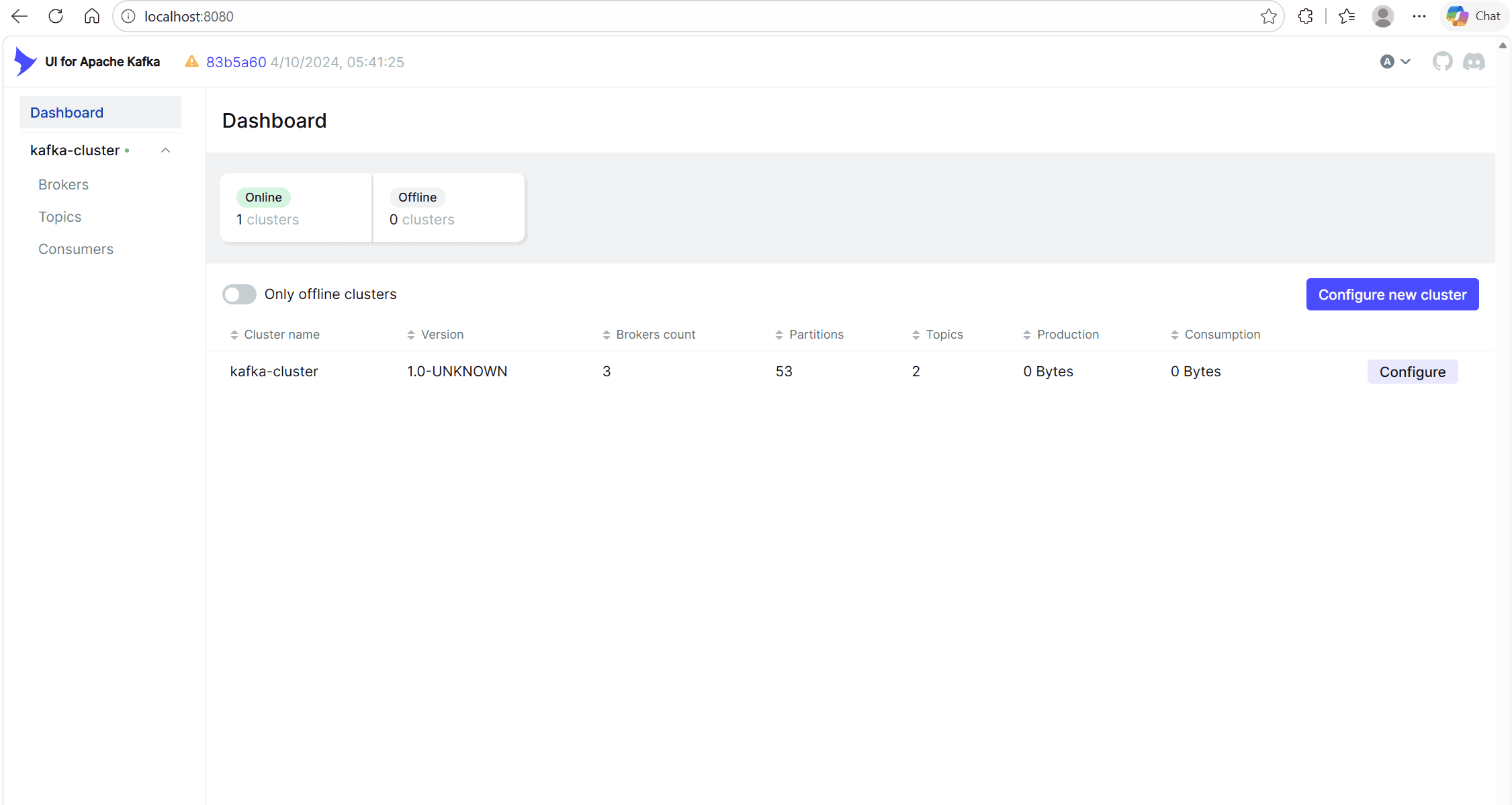
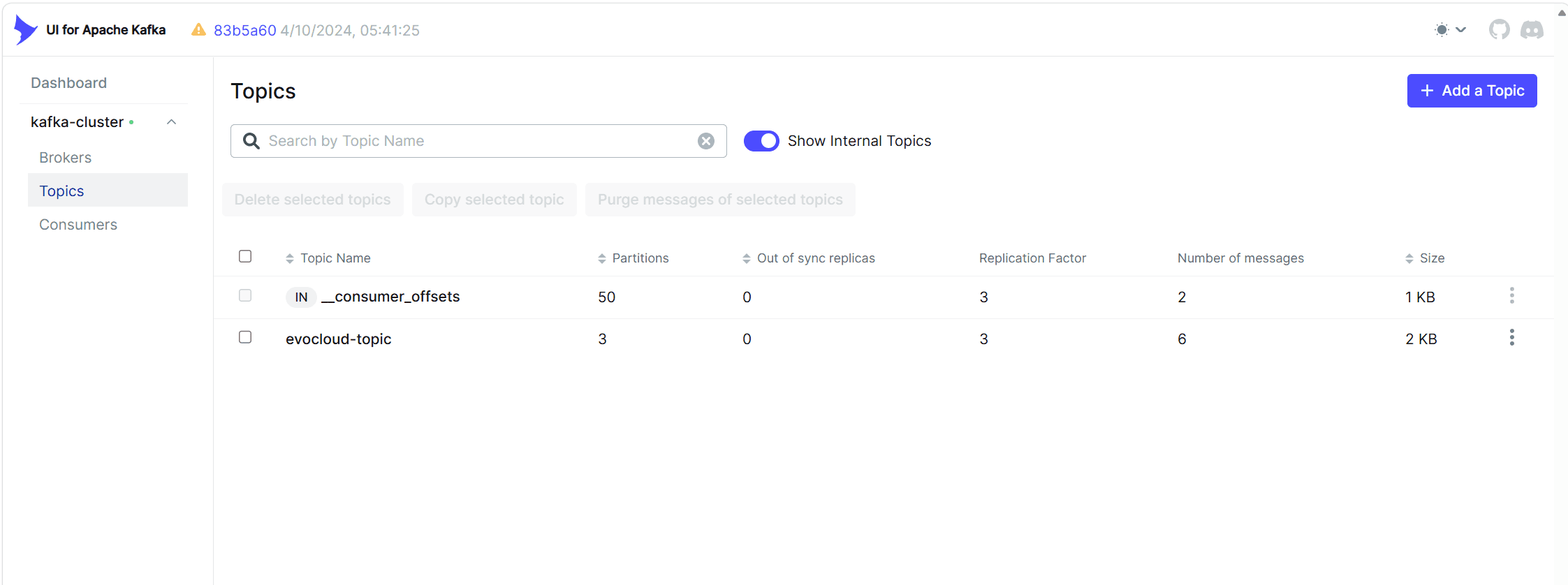
Kafka UI is a powerful open-source web interface for managing Apache Kafka clusters. It provides an intuitive dashboard to perform common administrative tasks, such as:
Topic management: Create, delete, list topics, and browse/view messages
Consumer group monitoring: Track lag, status, and manage consumer groups
Broker overview: View broker configurations, metrics, and cluster health
Congratulations! You now have a fully operational, production-grade Kafka cluster running on Kubernetes and managed by the Strimzi Kafka Operator. Your cluster includes:
Modern KRaft consensus (ZooKeeper-free architecture)
Separated controller and broker node pools for better scalability and isolation
High availability with multiple replicas across availability zones
Production-optimized configuration including proper storage, resources, and security foundations.
A Kafka UI dashboard for greater visibility and ease of management
In later tutorials we will implement monitoring for your Kafka Cluster. There are additional custom resources we did not have the chance to explore, but you can do so following these pointers:
KafkaUser Custom Resource — for declarative topic and user management (more details here).
KafkaConnect Custom Resource — for building data pipelines with connectors (more details here).
Kafka Bridge (HTTP Bridge) — for providing a RESTful HTTP interface to produce and consume messages (more details here).
MirrorMaker — for cross-cluster replication and disaster recovery (more details here).
Cruise Control Configuration — for automated cluster balancing and optimization (more details here).
Enjoyed this read? Get the next one in your inbox.
Sharp insights on cloud native, Kubernetes, and platform engineering — curated by the EvoCloud team. One concise email, delivered straight to your inbox. No fluff, no spam, unsubscribe any time.
Hand-picked tutorials, deep dives, and release notes
Cloud & platform-engineering trends worth your time
Early access to EvoCloud features and community events


 Arnaud S.Updated 12 minIntermediate